
Specialist LCD/OLED Supplier
|
|






vr display panel
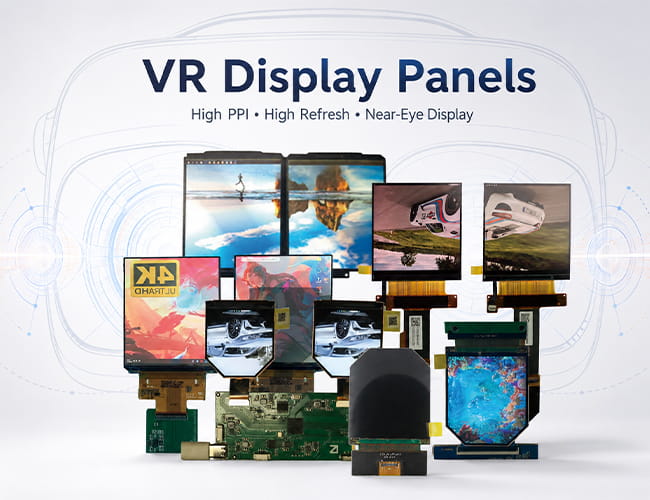
What Does “VR Display Panel” Mean?
A VR display panel is a near-eye display used inside a head-mounted display or wearable display device. It creates virtual images within a monocular or binocular field of view, allowing users to see immersive digital content at a very close viewing distance.
Because the display is enlarged through optical lenses, VR panels need higher pixel density, faster refresh rate, quicker response time, and better visual stability than ordinary small-size screens.
-
Size(inch)
- 0.39~1.0
- 1.0~1.9
- 2.0~2.9
- 3.0~3.9
- 4.0~4.9
- 5.0~5.9
- 6.0~6.9
- 7.0~7.9
- 8.0~9.9
- 10~20
-
Interface
- I2C
- SPI
- Parallal
- MCU
- CPU
- RGB
- MIPI
- LVDS
- eDP
- HDMI
-
Display Color
- Monochrome
- Double Color
- Full Color
-
Orientation
- Landscape
- Portrait
| Model | Size | Display Type | Resolution | Interface | Display Brand | Image | ||||||||||
|---|---|---|---|---|---|---|---|---|---|---|---|---|---|---|---|---|

2.1 inch LCD 90 Hz For VR HDMI Board
|
2.1 | TFT-LCD | 1600(RGB)×1600, 1058PPI | MIPI | BOE |
|
||||||||||

2.54 inch round/circular TFT-LCD For VR
|
2.45 | TFT-LCD | 1440(RGB)×1600 | MIPI | BOE |
|
||||||||||

2.9 inch TFT-LCD 120 Hz For VR
|
2.9 | TFT-LCD | 1440(RGB)×1440 | MIPI | Sharp |
|
||||||||||

2.9 inch LCD 2K Resolution 90 Hz For VR
|
2.9 | TFT-LCD | 2160x2160 | MIPI | Sharp |
|
||||||||||

2.95 inch OLED For VR
|
2.95 | AMOLED | 1080(RGB)×1200 | MIPI | EDO |
|
||||||||||

3 inch TFT-LCD 720X720 MIPI
|
3.1 inch | TFT-LCD | 720(RGB)×720 | MIPI | JDI |
|
||||||||||

3.5 inch LCD 90 Hz For VR
|
3.5 | TFT-LCD | 1440(RGB)×1600 | MIPI | BOE |
|
||||||||||

3.5 inch OLED 90 Hz For VR
|
3.5 | AMOLED | 1440(RG/BG)×1600 | MIPI | Samsung |
|
||||||||||

3.81 inch OLED 90Hz For VR
|
3.81 | AMOLED | 1080(RGB)×1200 | MIPI | AUO |
|
||||||||||

5.5 inch LCD 4K Resolution For Oculus VR
|
5.46 | TFT-LCD | 1920x3664 | MIPI | LG |
|

Why Near-Eye Display Matters for VR
Both AR and VR belong to near-eye display systems. The display panel creates light field information close to the human eye, while the optical structure projects the image into a comfortable viewing distance.
For VR headsets, this means the panel must deliver clear images after optical magnification. Low PPI, slow response, or unstable refresh performance can easily cause visible pixels, motion blur, eye fatigue, or dizziness.
Which Displays Are Good for VR HMD?
Both LCD and OLED can be used for VR HMDs, but not every LCD or OLED panel is suitable for VR. A professional display for VR usually needs high refresh rate, high PPI, compact size, and fast response time.
For many VR headset projects, 90Hz is a practical baseline, while 120Hz can provide smoother motion. PPI should generally be above 400, and response time should ideally stay below 10ms for a more comfortable viewing experience.
Key Requirements for VR Display Panels
VR display panels are usually selected around several important performance points: high resolution, high pixel density, fast refresh rate, low latency, quick response, and proper panel size.
For professional VR HMD development, display sizes from around 2.1 inch to 3.8 inch are commonly used because they help keep the headset compact. Larger mobile displays can reduce cost in some projects, but they may not provide the same near-eye visual performance as dedicated VR panels.
LCD or OLED for VR Applications
LCD panels are widely used in VR because they offer mature supply, high-resolution options, stable performance, and flexible cost control. High-PPI LCD panels can be suitable for headset prototypes, optical evaluation, and professional VR systems.
OLED and AMOLED panels are often chosen for higher contrast, deeper black levels, faster response, and more immersive image quality. They are especially useful for gaming, simulation, virtual cinema, and premium headset applications.
Professional VR Display vs Mobile Display
Some developers use 5.5 inch to 6.5 inch mobile displays for low-cost VR prototypes. This approach can reduce development cost, but the performance may not be ideal for professional VR products.
Compared with mobile displays, dedicated VR panels are usually better matched to near-eye optical systems. They can provide more suitable size, higher PPI, faster refresh rate, and better response performance for head-mounted display applications.
Common Applications for VR Display Panels
VR display panels are commonly used in gaming headsets, simulation training systems, medical education devices, industrial visualization, digital exhibition equipment, virtual museums, remote operation systems, and optical R&D platforms.
Different applications require different display solutions. Gaming headsets may focus on refresh rate and response time, while simulation and medical systems may need higher clarity, stable image quality, and comfortable long-session viewing.
Explore VR Display Solutions from Panox Display
Panox Display provides VR display panels for near-eye display and head-mounted display applications, including high-PPI LCD, high-refresh LCD, OLED, AMOLED, and MIPI display solutions.
Our VR display options can support headset prototypes, optical evaluation, gaming devices, training systems, digital exhibition products, and customized VR display modules. Controller boards, connectors, cover glass, and touch panel customization can also be supported according to project requirements.
More About VR Display Panels
What Is a VR Display Panel? How to Choose the Right Display for VR HeadsetsWhy VR Display Panels Matter for Headset Performance
VR Display Panel Applications: Where Display for VR Is Used
Customized Service
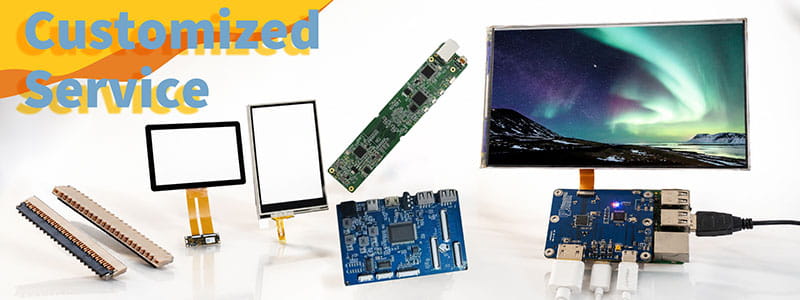
It`s just a beginning to get display panels from us, then clients need to solve cover glass/touch panel, driving board, connectors on PCB.Fortunately Panox Display provide complete display solutions.
Connectors
Panox Display provides free connectors for clients who purchase more than five products from us. Our product range includes connectors from Molex, Kyocera, AXE, AXG, JAE, Hiros, and more.
Cover Glass/Touch Panels
Panox Display provides a customized cover glass/touch panel service. We supply cover glass from Gorilla, AGC, and Panda, which all have excellent optical performance. We also supply driver ICs from Goodix and Focaltech.
Controller/Driver Boards
If your applications are directly connected to a PC, a cellphone, or Raspberry Pi, and you have enough space to insert a board to input video, Panox Display can provide customized Controller/Driver boards with input connections for VGA, HDMI, DVI, DP, Type-C video input, MIPI, RGB, LVDS, and eDP.
The functions of our boards include, but are not limited to, adjustment of brightness, sound output, touch interface, extra data transmission, and gyroscope.
Simple Instructions
#MIPI# How to Bring Up a MIPI DSI Display: A Practical Guide for Embedded Display Integration.
#MIPI# D-PHY and C-PHY Physical Layer Guide for Display Interfaces.
#MIPI#DSI PCB Layout Guidelines for Reliable Display Interfaces
#SPI#MCU# LCD MCU Interface and SPI Interface Explained: 8080 Parallel vs Serial LCD Connections.
#MIPI# DSI PCB Layout Guidelines for Reliable Display Interfaces
#MIPI# vs #LVDS# Display Interface Differences and Selection Guide
#MIPI DSI# Interface Guide: Protocol, D-PHY, Linux Driver Bring-Up, and Debugging
#POS LCD#How to Build Main and Secondary Display Output for POS Terminals
If our display fit your application, subscrlbe for monthly Insights
Panox Display Professional OLED/LCD Supplier and Manufacturer
- 📍 Shenzhen
- 📞 Phone: 86 755 3396 6409
- 📠 Skype: panoxwesley

If it`s urgent, try to contact
Whatsapp: +86 18665870665
Skype: panoxwesley
QQ: 407417798