
Specialist LCD/OLED Supplier
|
|






in-cell display panel
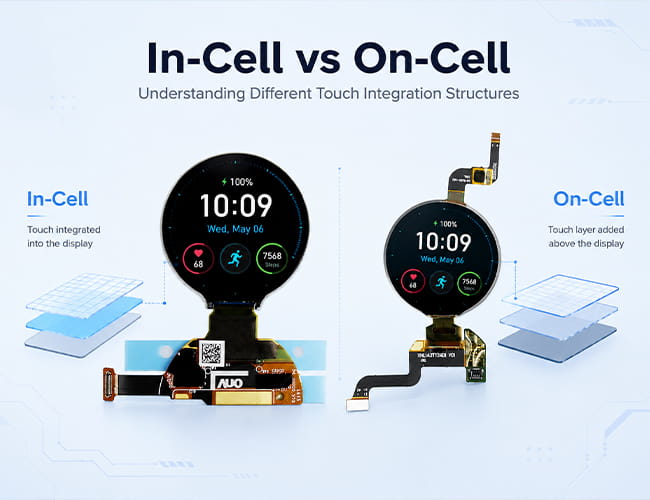
What Does “In-Cell Display” Mean?
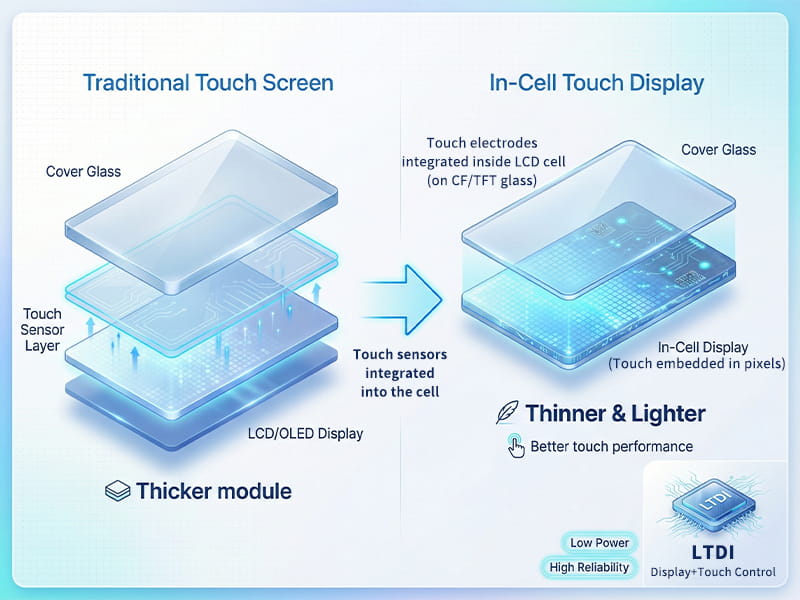
In-cell is a structure that embedding touch panel functions into LCD pixelsIn-cell technology changed the production process of normal screens, embedding touch sensors directly inside the display, reducing thickness of the touch screen, making the screen thinner and lighter... The touch sensor is completely built into the Cell. The light and simple module brings more excellent touch performance. The LTDI chip integrates display and touch control to achieve low power consumption and high reliability touch display.
-
Size(inch)
- 0.39~1.0
- 1.0~1.9
- 2.0~2.9
- 3.0~3.9
- 4.0~4.9
- 5.0~5.9
- 6.0~6.9
- 7.0~7.9
- 8.0~9.9
- 10~20
-
Interface
- I2C
- SPI
- Parallal
- MCU
- CPU
- RGB
- MIPI
- LVDS
- eDP
- HDMI
-
Display Color
- Monochrome
- Double Color
- Full Color
-
Orientation
- Landscape
- Portrait
| Model | Size | Display Type | Resolution | Interface | Display Brand | Image | ||||||||||
|---|---|---|---|---|---|---|---|---|---|---|---|---|---|---|---|---|

1.2 inch Round/Circular OLED For Wearable Smartwatch
|
1.2 | AMOLED | 390(RGB)×390 | SPI,MIPI | AUO |
|
||||||||||
5.99-Inch 1440x2880 Flexible AMOLED Display | BOE OLED for Huawei Smartphone
|
5.99 inch | AM-OLED , OLED | 1440 x 2880 | MIPI | BOE&Huawei |
|
||||||||||
6.52 inch Flexible OLED 2520x840 Touch Panel
|
6.52 inch | AM-OLED , OLED | 2520(RGB)×840 407 PPI | MIPI | CSOT |
|
||||||||||

6.67inch Flexible AMOLED 2K for Smartphone
|
6.67 | OLED , AM-OLED | 1080*2400 | MIPI | Tianma |
|
||||||||||

8 inch Flexible/Foldable OLED
|
8.01 | AMOLED | 2480x1860 | MIPI | CSOT |
|
Why In-Cell Touch Matters for Compact Devices
For smartphones, wearables, foldable devices, AR/MR interfaces, and handheld electronics, the display module needs to be thin, responsive, and easy to integrate. In-Cell touch helps simplify the front display stack, reduce assembly complexity, and keep the visual surface cleaner.
This is especially important for flexible OLED and AMOLED products, where every layer can affect thickness, bending performance, optical clarity, and mechanical design.
Advantages Of In Cell Display
Traditional touch screens use a three-layer design. On the bottom is an LCD/OLED screen, on top of which is a touch pad, and above that is diamond glass. Touch screens work by sensing changes in light or pressure, both of which occur when the user touches the glass surface of the trackpad. But it's the trackpad that actually senses the "touch input" of the user's finger. The reason for the need for a touch pad is that traditional LCD screens have the ability to display but not "feel".
The innovation of the In-Cell trackpad is that the LCD is loaded with circuitry, so that the LCD has the touch input sensing capability of a traditional trackpad.
Lighter And Thinner
The in-Cell trackpad is not only more accurate, but it also eliminates the need for a trackpad, circuit on cover glass, making the entire touchscreen much lighter.
More readable in the sun
Traditional touch screens are hard to read in the sun because of the gap between the LCD and the touchpad. This results in poor readability and can cause parallax.
Clearer Image
Without touch panel and OCA layer, the transmittance become higher and make the image clearer.
Common Applications for In-Cell Displays
In-Cell displays are commonly used in smartphones, smartwatches, wearable devices, foldable products, automotive interfaces, AR/MR auxiliary screens, portable instruments, and compact industrial control systems.
A round AMOLED display may be used for a smartwatch or health monitoring device, while a flexible AMOLED panel may be suitable for smartphones, foldable prototypes, curved interfaces, or next-generation mobile products.
In-Cell vs On-Cell: What Buyers Should Know
In-Cell and On-Cell are both integrated touch solutions, but their touch structures are different. In-Cell touch is integrated deeper within the display module structure, while On-Cell touch is usually placed above the display cell.
For buyers, the key point is to check the full module design, including touch interface, cover glass requirements, FPC layout, bending limits, and controller support. The best choice depends on the final product structure, thickness target, and application environment.
More About In-Cell Displays
What Is an In-Cell Display? A Practical Guide to Integrated Touch Technology
Why Is In-Cell Touch Important for Flexible OLED Displays?
Applications of In-Cell Displays: Where Integrated Touch Makes the Most Sense
Customized Service
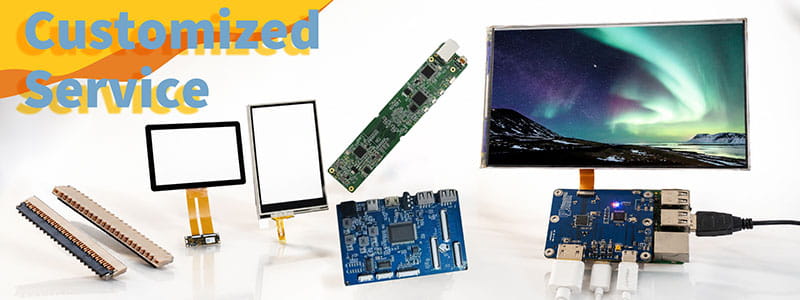
It`s just a beginning to get display panels from us, then clients need to solve cover glass/touch panel, driving board, connectors on PCB.Fortunately Panox Display provide complete display solutions.
Connectors
Panox Display provides free connectors for clients who purchase more than five products from us. Our product range includes connectors from Molex, Kyocera, AXE, AXG, JAE, Hiros, and more.
Cover Glass/Touch Panels
Panox Display provides a customized cover glass/touch panel service. We supply cover glass from Gorilla, AGC, and Panda, which all have excellent optical performance. We also supply driver ICs from Goodix and Focaltech.
Controller/Driver Boards
If your applications are directly connected to a PC, a cellphone, or Raspberry Pi, and you have enough space to insert a board to input video, Panox Display can provide customized Controller/Driver boards with input connections for VGA, HDMI, DVI, DP, Type-C video input, MIPI, RGB, LVDS, and eDP.
The functions of our boards include, but are not limited to, adjustment of brightness, sound output, touch interface, extra data transmission, and gyroscope.
Simple Instructions

#MIPI# How to Bring Up a MIPI DSI Display: A Practical Guide for Embedded Display Integration.
#MIPI# D-PHY and C-PHY Physical Layer Guide for Display Interfaces.
#MIPI#DSI PCB Layout Guidelines for Reliable Display Interfaces
#SPI#MCU# LCD MCU Interface and SPI Interface Explained: 8080 Parallel vs Serial LCD Connections.
#MIPI# DSI PCB Layout Guidelines for Reliable Display Interfaces
#MIPI# vs #LVDS# Display Interface Differences and Selection Guide
#MIPI DSI# Interface Guide: Protocol, D-PHY, Linux Driver Bring-Up, and Debugging
#POS LCD#How to Build Main and Secondary Display Output for POS Terminals
If our display fit your application, subscrlbe for monthly Insights
Panox Display Professional OLED/LCD Supplier and Manufacturer
- 📍 Shenzhen
- 📞 Phone: 86 755 3396 6409
- 📠 Skype: panoxwesley

If it`s urgent, try to contact
Whatsapp: +86 18665870665
Skype: panoxwesley
QQ: 407417798