
Specialist LCD/OLED Supplier
|
|






monitor-display display panel
What Is a Monitor Display Panel?
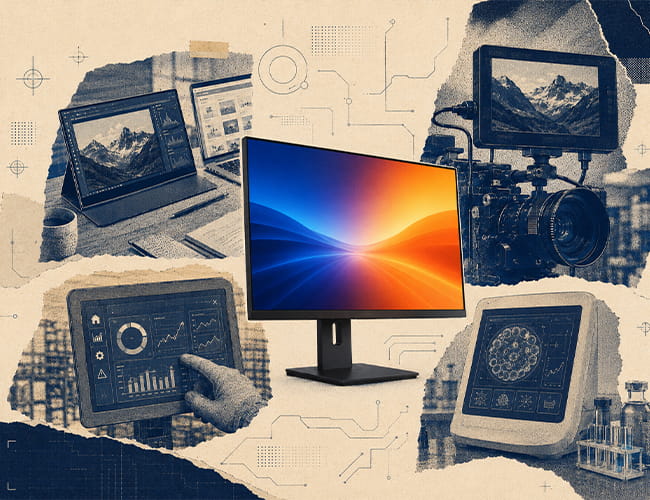
A monitor display panel is the core screen component used to build monitor-style products — portable monitors, embedded visual terminals, camera monitors, inspection displays, and premium interactive devices. Unlike a finished monitor, a bare panel is supplied as a module: the panel itself, plus the touch layer, cover glass, connectors, and controller board that turn it into a working display system. Panel type, resolution, contrast, interface, and thickness together decide how the final product looks and feels.
-
Size(inch)
- 0.39~1.0
- 1.0~1.9
- 2.0~2.9
- 3.0~3.9
- 4.0~4.9
- 5.0~5.9
- 6.0~6.9
- 7.0~7.9
- 8.0~9.9
- 10~20
-
Interface
- I2C
- SPI
- Parallal
- MCU
- CPU
- RGB
- MIPI
- LVDS
- eDP
- HDMI
-
Display Color
- Monochrome
- Double Color
- Full Color
-
Orientation
- Landscape
- Portrait
| Model | Size | Display Type | Resolution | Interface | Display Brand | Image | ||||||||||
|---|---|---|---|---|---|---|---|---|---|---|---|---|---|---|---|---|

15.6 inch OLED 4K Resolution For Laptop
|
15.6 | AMOLED | 3840(RGB)×2160 | LVDS | EDO |
|
||||||||||

15.6 inch Full Color OLED Display 4K Touch Panel
|
15.6 | AMOLED | 3840×2160 | LVDS | Samsung |
|
Why Panel Choice Matters for Monitor Products
The display panel carries the first impression of any monitor-style product. Resolution and pixel density decide text sharpness at close viewing distance, contrast and color decide how professional the image looks, and thickness decides how slim the final design can be. Interface matters just as much: bare panels typically use eDP, LVDS, or MIPI rather than HDMI, so the controller board must be planned together with the panel. Regarding image quality for monitor use, OLED offers deeper black and faster response, while LCD offers higher sustained brightness and longer static display time.
How to Drive a Monitor Display Panel: Interface and Controller Board
A bare monitor display panel cannot connect to HDMI or Type-C directly. Panel-side signals are typically eDP, LVDS, or MIPI, while PCs, cameras, and single-board computers output HDMI, DisplayPort, or Type-C — so a controller board is needed to bridge the two. For 4K panels this bridge must be specified carefully, because UHD resolution demands higher signal bandwidth, clean board layout, and correct timing. Panox Display supports this step with eDP-to-HDMI controller boards, free connectors, adapter boards for fly-wire testing, and customized HDMI / Type-C input board development.
OLED or LCD: Which Monitor Panel Should You Choose?
The right choice starts from the operating environment, not the technology name. OLED is the stronger fit when deep black, high contrast, fast response, wide color, and a thin module matter — portable 4K monitors, camera monitors, creative review, and premium embedded devices. LCD is often the better call for always-on dashboards, bright or sunlit environments, long static UI display, and cost-sensitive high-volume products. In short: dark, changing content in controlled light leans OLED; bright rooms and long static interfaces lean LCD.
Common Applications for Monitor Display Panels
Monitor display panels are widely used in portable 4K monitors, laptop companion screens, camera and field monitors, creative review displays, industrial inspection and machine-vision screens, medical and laboratory interfaces, embedded touch terminals, gaming and simulation displays, and engineering evaluation kits. Different applications need different priorities: a portable monitor values thinness and pixel density, a camera monitor values contrast and response, while an always-on industrial dashboard may favor LCD for long static operation.
Explore Monitor Display Solutions from Panox Display
Panox Display provides monitor display panels centered on 15.6-inch AMOLED 4K (3840×2160) options from Samsung and EDO, with 100% DCI-P3 color, 100,000:1 contrast, 1 ms response, and a 2.2 mm ultra-thin profile. Support goes beyond the panel: full-lamination capacitive touch service, customized cover glass, connectors, adapter boards, and eDP-to-HDMI / Type-C controller boards help turn a bare panel into a working monitor product. Browse our monitor display selection for your next portable monitor, embedded system, or professional display project.
More About Monitor Display
Monitor Display Panels: A Practical Guide to 4K OLED and LCD Screens
Why Monitor Display Panel Quality Matters More Than the Spec Sheet
Monitor Display Panel Applications: Where 4K OLED and LCD Panels Are Used
Customized Service
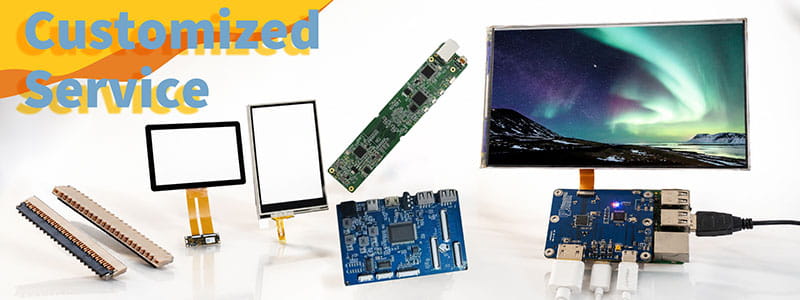
It`s just a beginning to get display panels from us, then clients need to solve cover glass/touch panel, driving board, connectors on PCB.Fortunately Panox Display provide complete display solutions.
Connectors
Panox Display provides free connectors for clients who purchase more than five products from us. Our product range includes connectors from Molex, Kyocera, AXE, AXG, JAE, Hiros, and more.
Cover Glass/Touch Panels
Panox Display provides a customized cover glass/touch panel service. We supply cover glass from Gorilla, AGC, and Panda, which all have excellent optical performance. We also supply driver ICs from Goodix and Focaltech.
Controller/Driver Boards
If your applications are directly connected to a PC, a cellphone, or Raspberry Pi, and you have enough space to insert a board to input video, Panox Display can provide customized Controller/Driver boards with input connections for VGA, HDMI, DVI, DP, Type-C video input, MIPI, RGB, LVDS, and eDP.
The functions of our boards include, but are not limited to, adjustment of brightness, sound output, touch interface, extra data transmission, and gyroscope.
Simple Instructions
#MIPI# How to Bring Up a MIPI DSI Display: A Practical Guide for Embedded Display Integration.
#MIPI# D-PHY and C-PHY Physical Layer Guide for Display Interfaces.
#MIPI#DSI PCB Layout Guidelines for Reliable Display Interfaces
#SPI#MCU# LCD MCU Interface and SPI Interface Explained: 8080 Parallel vs Serial LCD Connections.
#MIPI# DSI PCB Layout Guidelines for Reliable Display Interfaces
#MIPI# vs #LVDS# Display Interface Differences and Selection Guide
#MIPI DSI# Interface Guide: Protocol, D-PHY, Linux Driver Bring-Up, and Debugging
#POS LCD#How to Build Main and Secondary Display Output for POS Terminals
If our display fit your application, subscrlbe for monthly Insights
Panox Display Professional OLED/LCD Supplier and Manufacturer
- 📍 Shenzhen
- 📞 Phone: 86 755 3396 6409
- 📠 Skype: panoxwesley

If it`s urgent, try to contact
Whatsapp: +86 18665870665
Skype: panoxwesley
QQ: 407417798