
Specialist LCD/OLED Supplier
|
|






hdmi-controller-board display panel
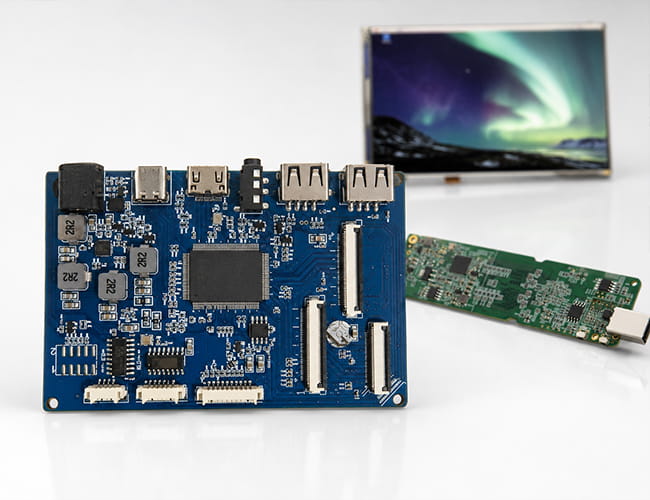
What Is an HDMI Controller Board?
An HDMI controller board is a driver board that converts a standard HDMI video signal into the interface a raw display panel actually needs, such as MIPI, LVDS, RGB, or eDP. A bare LCD or OLED panel cannot accept HDMI directly, so the controller board handles signal conversion, timing, power sequencing, and backlight control to turn the panel into a working display. Panox Display have made HDMI Controller Board or Type-C Controller Board for following displays, we have not developed controller board for every display because time is limited, feel free to contact us if you need customized driver board for some LCD, OLED displays.
-
Size(inch)
- 0.39~1.0
- 1.0~1.9
- 2.0~2.9
- 3.0~3.9
- 4.0~4.9
- 5.0~5.9
- 6.0~6.9
- 7.0~7.9
- 8.0~9.9
- 10~20
-
Interface
- I2C
- SPI
- Parallal
- MCU
- CPU
- RGB
- MIPI
- LVDS
- eDP
- HDMI
-
Display Color
- Monochrome
- Double Color
- Full Color
-
Orientation
- Landscape
- Portrait
| Model | Size | Display Type | Resolution | Interface | Display Brand | Image | ||||||||||
|---|---|---|---|---|---|---|---|---|---|---|---|---|---|---|---|---|

2.45 inch TFT-LCD Display
|
2.45 | TFT-LCD | 240(RGB)×432 | MIPI | AUO |
|
||||||||||

2.47 inch Round TFT-LCD 480X480 MIPI
|
2.5 inch | a-Si TFT-LCD, LCM | 480(RGB)×480 194PPI | MIPI | BOE |
|
||||||||||

2.54 inch round/circular TFT-LCD For VR
|
2.45 | TFT-LCD | 1440(RGB)×1600 | MIPI | BOE |
|
||||||||||

2.9 inch TFT-LCD 120 Hz For VR
|
2.9 | TFT-LCD | 1440(RGB)×1440 | MIPI | Sharp |
|
||||||||||

2.9 inch LCD 2K Resolution 90 Hz For VR
|
2.9 | TFT-LCD | 2160x2160 | MIPI | Sharp |
|
||||||||||

2.95 inch OLED For VR
|
2.95 | AMOLED | 1080(RGB)×1200 | MIPI | EDO |
|
||||||||||

3 inch TFT-LCD 720X720 MIPI
|
3.1 inch | TFT-LCD | 720(RGB)×720 | MIPI | JDI |
|
||||||||||

3.4 inch Round/Circular LCD For Medical/Smart Home Control Board
|
3.4 | TFT-LCD | 800(RGB)×800 231PPI | MIPI | Tianma |
|
||||||||||

3.5 inch LCD 90 Hz For VR
|
3.5 | TFT-LCD | 1440(RGB)×1600 | MIPI | BOE |
|
||||||||||

3.5 inch OLED 90 Hz For VR
|
3.5 | AMOLED | 1440(RG/BG)×1600 | MIPI | Samsung |
|
||||||||||

3.81 inch OLED 90Hz For VR
|
3.81 | AMOLED | 1080(RGB)×1200 | MIPI | AUO |
|
||||||||||
3.9 inch AMOLED Display 480x854 Full Color Small OLED Module MIPI
|
3.91 inch Diagonal | AM-OLED , OLED | 480 × 854 RGB | MIPI | Samsung |
|
Why an HDMI Controller Board Matters
For developers connecting a display to a PC, Raspberry Pi, mini PC, or media player, the controller board is what makes the panel usable without designing a custom host system. It lets a single-board computer or laptop drive a high-resolution MIPI or LVDS panel as if it were an ordinary monitor.
This is especially useful for prototyping, single-board computer projects, custom monitors, industrial equipment, and panel repurposing. The board manages the parts that are easy to get wrong on a bare panel: input conversion, initialization, timing, and backlight driving.
Common Applications for HDMI Controller Boards
HDMI controller boards are commonly used in Raspberry Pi and SBC dashboards, DIY and maker displays, industrial HMIs, portable monitors, evaluation and test setups, and the repair or repurposing of salvaged LCD panels.
Different projects need different conversion paths. A Raspberry Pi dashboard may need HDMI to MIPI for a compact high-resolution panel, while a recovered laptop screen may need HDMI to LVDS or eDP. A space-constrained product may use a Type-C board instead of full-size HDMI. The right board depends on the panel's native interface, resolution, and the available mounting space.
Explore HDMI Controller Board Solutions from Panox Display
Panox Display provides customized HDMI and Type-C controller boards for LCD and OLED panels, with input options including HDMI, Type-C, VGA, DVI, and DP, and output to MIPI, LVDS, RGB, or eDP. Board functions can include brightness adjustment, audio output, touch interface support, and custom shapes to fit enclosures such as Raspberry Pi.
Browse our controller board solutions, or send your panel model and requirements to get a board matched to your display.
More About HDMI Controller Boards
Why LCD Need Controller Board ?
MIPI vs LVDS: Display Interface Differences and Selection Guide
MIPI DSI Interface Guide: Protocol, D-PHY, Linux Driver Bring-Up, and Debugging
Define IPS Screen: What IPS Means in a Display Specification
HDMI Communication Protocol: How HDMI Transfers Video, Audio and Control Data
How Does HDMI Work? A Practical Guide to HDMI Protocol, TMDS, FRL, EDID, and Display Integration
Raspberry Pi OLED Screen: How to Connect SSD1306, Run Python, and Choose HDMI Display Options
Is IPS Good for Gaming? What Refresh Rate and Response Time Really Mean
What Is an SPI Display? Refresh Rate, Performance Limits, and SPI vs. MIPI
HDMI to LVDS Converter: How It Works and How to Choose the Right Board
Which 7-Inch OLED Touch Screens Are Best for Portable Devices?
Customized Service
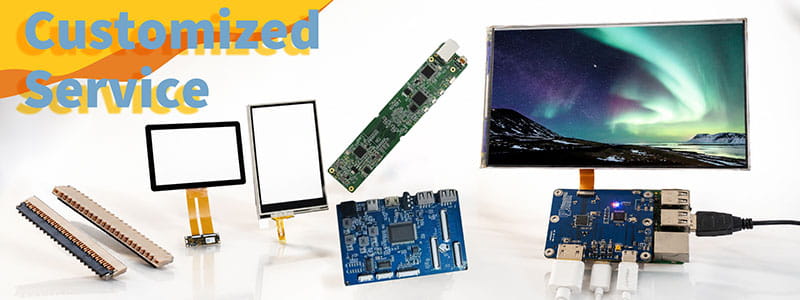
It`s just a beginning to get display panels from us, then clients need to solve cover glass/touch panel, driving board, connectors on PCB.Fortunately Panox Display provide complete display solutions.
Connectors
Panox Display provides free connectors for clients who purchase more than five products from us. Our product range includes connectors from Molex, Kyocera, AXE, AXG, JAE, Hiros, and more.
Cover Glass/Touch Panels
Panox Display provides a customized cover glass/touch panel service. We supply cover glass from Gorilla, AGC, and Panda, which all have excellent optical performance. We also supply driver ICs from Goodix and Focaltech.
Controller/Driver Boards
If your applications are directly connected to a PC, a cellphone, or Raspberry Pi, and you have enough space to insert a board to input video, Panox Display can provide customized Controller/Driver boards with input connections for VGA, HDMI, DVI, DP, Type-C video input, MIPI, RGB, LVDS, and eDP.
The functions of our boards include, but are not limited to, adjustment of brightness, sound output, touch interface, extra data transmission, and gyroscope.
Simple Instructions
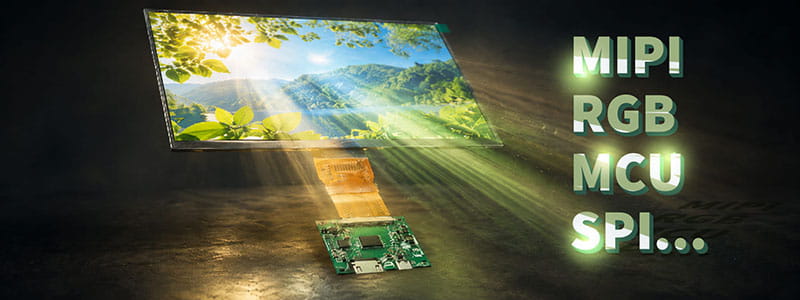
#MIPI# How to Bring Up a MIPI DSI Display: A Practical Guide for Embedded Display Integration.
#MIPI# D-PHY and C-PHY Physical Layer Guide for Display Interfaces.
#MIPI#DSI PCB Layout Guidelines for Reliable Display Interfaces
#SPI#MCU# LCD MCU Interface and SPI Interface Explained: 8080 Parallel vs Serial LCD Connections.
#MIPI# DSI PCB Layout Guidelines for Reliable Display Interfaces
#MIPI# vs #LVDS# Display Interface Differences and Selection Guide
#MIPI DSI# Interface Guide: Protocol, D-PHY, Linux Driver Bring-Up, and Debugging
#POS LCD#How to Build Main and Secondary Display Output for POS Terminals
If our display fit your application, subscrlbe for monthly Insights
Panox Display Professional OLED/LCD Supplier and Manufacturer
- 📍 Shenzhen
- 📞 Phone: 86 755 3396 6409
- 📠 Skype: panoxwesley

If it`s urgent, try to contact
Whatsapp: +86 18665870665
Skype: panoxwesley
QQ: 407417798