







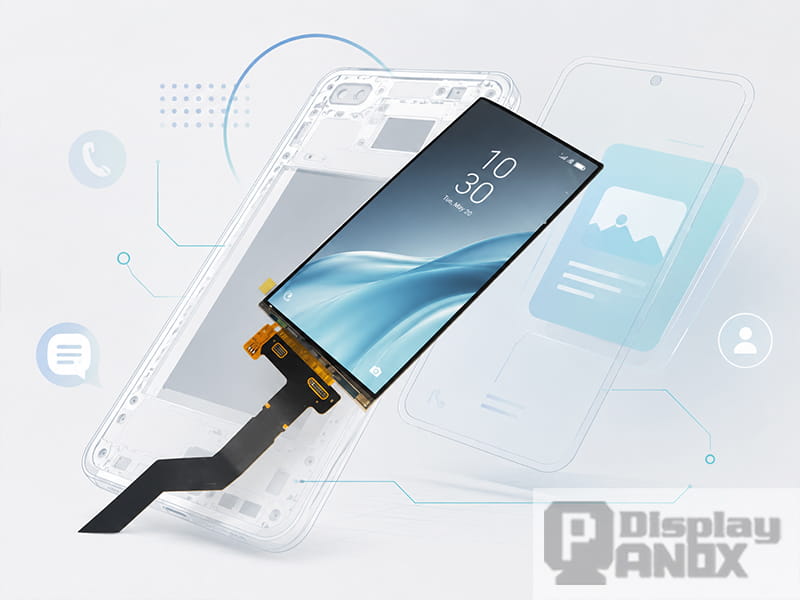
6.0 inch LCD For Cellphone/3D Printing
The display is one of the most important parts of a mobile device. It affects how sharp the image looks, how smoothly users interact with the interface, how much power the product consumes, and even how comfortable the device feels after long daily use.
In smartphones and handheld electronics, the display is no longer just a window for showing content. It is part of the product structure, the touch interface, the industrial design, and the user experience. A good mobile display panel needs to balance resolution, brightness, contrast, power consumption, thickness, touch integration, interface compatibility, and long-term visual comfort.
Many users notice a strange problem after upgrading to a more expensive smartphone: the new phone looks brighter, thinner, and more colorful, but the eyes feel more tired. Some people may experience dryness, pressure around the eyes, dizziness, or headache, especially when using the phone at night or at low brightness. In many cases, this discomfort is related to how the display controls brightness.
That is why mobile display selection should not only focus on resolution and color. For a real product, brightness control, dimming method, touch structure, optical design, and application environment are just as important.
1. What Is a Mobile Display Panel?
A mobile display panel is a compact screen module designed for smartphones, handheld terminals, portable electronics, navigation devices, game consoles, smart controllers, and custom mobile products. It usually includes a high-density display cell, driver IC, FPC connection, and sometimes an integrated touch panel.
Common mobile display technologies include TFT-LCD, AMOLED, flexible OLED, in-cell touch display, and on-cell touch display. Each technology has its own advantages.
TFT-LCD is still useful for cost-sensitive products, stable long-term supply, and projects that need conventional backlight-based brightness control. AMOLED and flexible OLED are widely used in modern smartphone-style devices because they offer high contrast, fast response, thin structure, wide color performance, and more freedom for curved or slim product design.
For mobile products, the right display is not simply the one with the highest resolution. The better choice is the panel that fits the device structure, usage environment, user interaction, battery strategy, and development schedule.
2. Why Some OLED Phones Feel More Tiring to Use
Many high-end smartphones use OLED or AMOLED displays. OLED pixels emit light by themselves, so the panel does not need a separate backlight. This allows pure black, high contrast, fast response, and very thin mechanical design.
However, OLED brightness control is different from many traditional LCD solutions. A large number of OLED smartphone displays use PWM dimming, especially at low brightness.
PWM stands for Pulse Width Modulation. Instead of lowering the current in a smooth continuous way, the display rapidly turns light output on and off. The user does not usually see this flashing directly because the frequency is high, but the light output is still changing over time. The perceived brightness depends on the duty cycle: if the light stays on for a longer portion of each cycle, the screen looks brighter; if it stays off for longer, the screen looks darker.
For users who are sensitive to flicker, low-frequency PWM or deep modulation may cause eye fatigue, headache, or discomfort. The effect can become more noticeable at night because many OLED panels switch to stronger PWM behavior at lower brightness levels.
This does not mean OLED is a bad display technology. OLED remains one of the most powerful display choices for modern mobile devices. The key is to understand how dimming works and to choose the right panel and driving strategy for the target application.
3. DC Dimming vs PWM Dimming
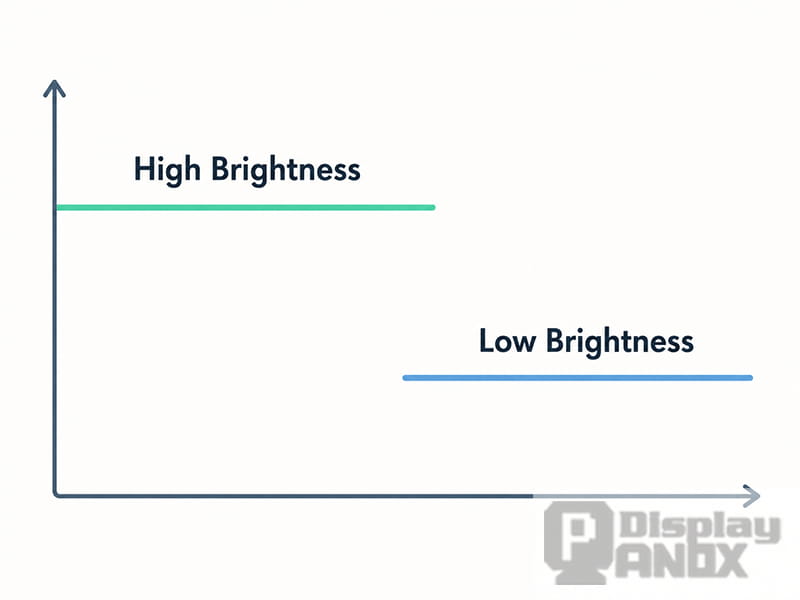
DC dimming
Mobile displays usually control brightness through two main methods: DC dimming and PWM dimming.
DC dimming adjusts brightness by changing the current or voltage supplied to the light source. Many LCD displays use DC dimming to control the backlight. Since the light output is adjusted more directly, visible flicker is usually less of a concern when the circuit is designed properly.
PWM dimming controls brightness by switching the light output on and off at high speed. This method can help maintain color stability and efficiency in some OLED systems, but it may introduce temporal light modulation. The impact depends on frequency, modulation depth, duty cycle, brightness level, and the sensitivity of the user.
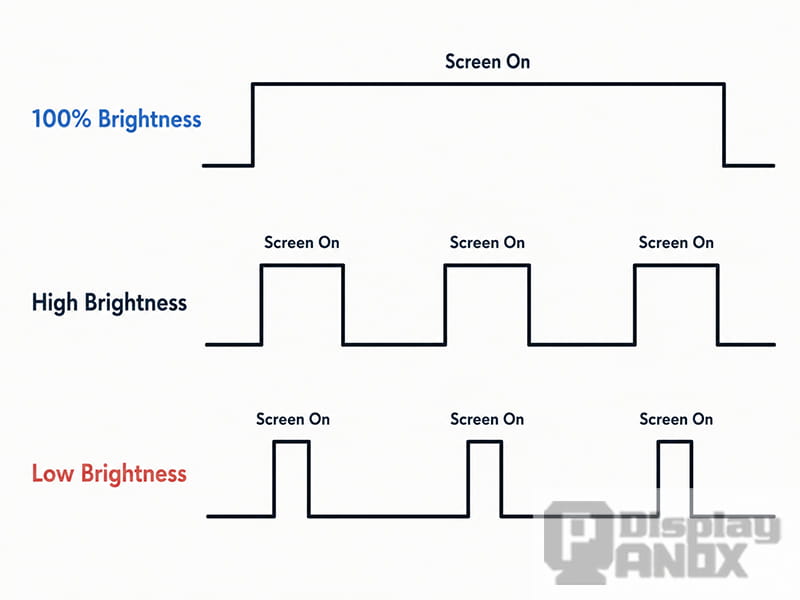
PWM dimming
In practical terms, a display with obvious low-frequency PWM at low brightness may feel uncomfortable to some users, even if the screen has excellent color and contrast. A display with high-frequency PWM, hybrid dimming, or a well-designed dimming curve can provide a better balance between OLED image quality and visual comfort.
For B2B projects, this matters because the final device may be used for long periods. A handheld terminal, medical handheld device, portable controller, or navigation product may stay in front of the user’s eyes for hours. In these cases, screen comfort becomes a product feature, not a small technical detail.
4. A Quick Way to Observe Screen Flicker
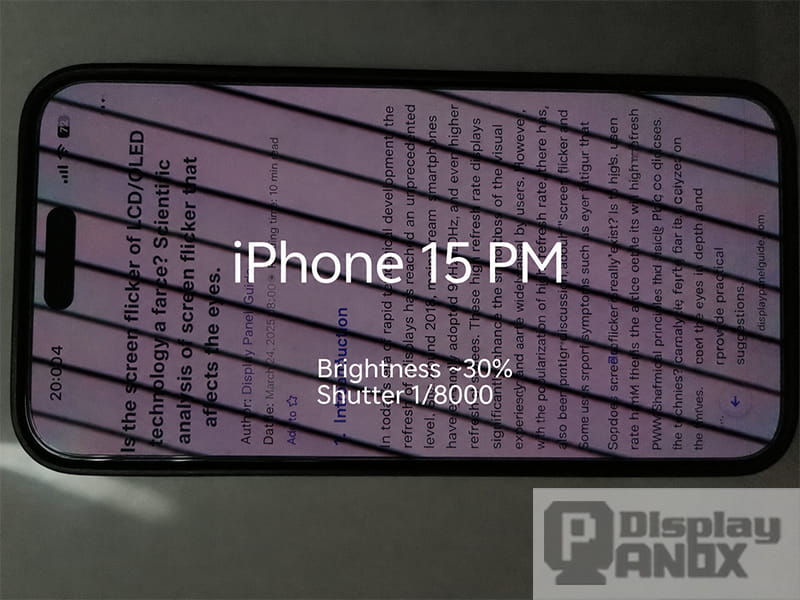
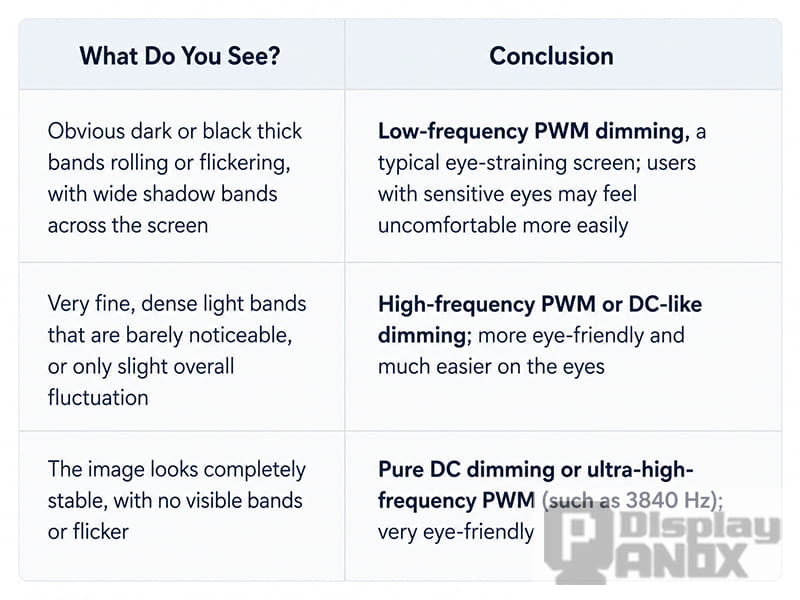
A simple way to observe possible screen flicker is to use another smartphone camera in manual or professional mode. Set the shutter speed very high, such as 1/4000 second or higher, then point the camera at the screen being tested. If dark rolling bands or strong stripes appear, the display may be using PWM dimming or another form of temporal modulation.
This method is not a laboratory-level test. Camera sensors, shutter type, refresh rate, exposure settings, and screen brightness can all affect the result. However, it can help developers and users make a quick visual comparison between different screens.
For a more accurate evaluation, professional flicker measurement equipment should be used. Important factors include PWM frequency, modulation depth, flicker percentage, flicker index, and metrics such as SVM when evaluating stroboscopic visibility.
When testing OLED phones, brightness should also be considered. Some displays behave differently at high brightness and low brightness. A screen may look relatively stable at 80% brightness but show clear bands at 20% brightness. This is one reason why many users feel more eye strain when using a phone in a dark room.
5. What Makes a Good Mobile Display Panel?
A good mobile display panel is not defined by one number. Resolution, PPI, contrast ratio, brightness, refresh rate, touch structure, interface, viewing angle, operating temperature, mechanical outline, and power consumption all need to match the final application.
For smartphone-style products, AMOLED and flexible OLED are attractive because they support thin and lightweight product designs. A flexible OLED can help create curved edges, slimmer bodies, or special form factors. In-cell and on-cell touch structures can reduce module thickness and simplify the cover glass design.
For handheld game consoles and portable GPS devices, brightness, contrast, refresh rate, touch response, and viewing angle become more important. A larger display with high luminance and strong contrast can improve readability for maps, game interfaces, outdoor operation, and rich UI content.
For industrial handheld devices, medical terminals, and smart controllers, reliability is often more important than only visual impact. Operating temperature, FPC direction, connector type, cover glass treatment, and controller board support should be checked early in the design stage.
6. Panox Display Mobilephone Display Panel Options
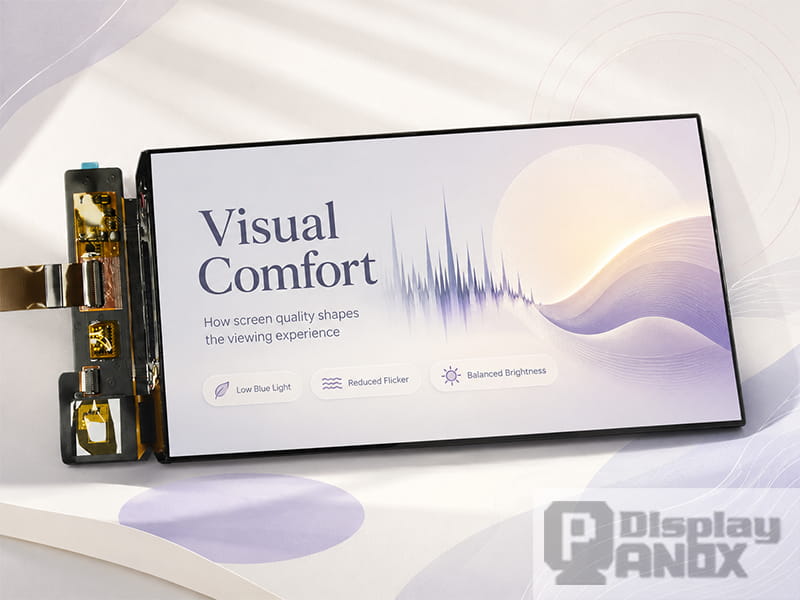
7 inch AMOLED OLED 1920X1080 Mipi
Panox Display provides mobilephone display panels for smartphones, handheld devices, portable electronics, navigation systems, gaming products, and custom display projects. The product range includes AMOLED, flexible OLED, TFT-LCD, MIPI display panels, in-cell touch, on-cell touch, and customized cover glass or touch panel solutions.
Below are several mobile display panel examples from Panox Display.
| Product | Display Type | Resolution | Interface | Key Features | Suitable Applications |
|---|---|---|---|---|---|
| 5.1 inch Flexible OLED On-Cell PCAP | AMOLED, BOE | 720 × 1520, 330 PPI | MIPI, 4 lanes | 390 cd/m², 76,000:1 contrast, on-cell PCAP, 60 Hz, 5 g | Mobile phone, slim handheld device |
| 5.5 inch OLED FHD On-Cell PCAP | AMOLED, BOE | 1080 × 1920, FHD, 327 PPI | MIPI, 4 lanes | 350 cd/m², 17,000:1 contrast, on-cell touch, wide temperature | Cellphone, VR-related device |
| 5.99 inch Flexible AMOLED | AMOLED, BOE | 1440 × 2880 | MIPI-DSI, 4 lanes | 495 cd/m², 90,000:1 contrast, 1 ms response, in-cell touch | Smartphone, AR/MR, vehicle-related device |
| 6.52 inch Flexible OLED Touch Panel | Flexible OLED, CSOT | 2520 × 840, 407 PPI | MIPI | 430 cd/m², 90 Hz, 3:1 aspect ratio, in-cell touch | Smartphone, AR/MR, vehicle display, wraparound design |
| 6.67 inch Flexible AMOLED 2K | OLED / AM-OLED, Tianma | 1080 × 2400, 394 PPI | MIPI | 700 cd/m², 80,000:1 contrast, 1 ms response, in-cell PCAP | Smartphone, high-resolution mobile product |
| 7 inch AMOLED OLED | OLED / AM-OLED | 1080 × 1920, FHD, 315 PPI | MIPI, 4 lanes | 800 cd/m², 100,000:1 contrast, 165 Hz, on-cell touch | Mobilephone, portable GPS, handheld game console |
These specifications show why mobile display selection should be application-based. A 5.1 inch flexible OLED may be better for compact smartphone-style projects where thinness and touch integration matter. A 6.52 inch flexible OLED with a 3:1 ratio can support special long mobile interfaces or curved product concepts. A 7 inch AMOLED panel with 800 cd/m² luminance and 165 Hz refresh rate is more suitable for handheld game consoles, portable GPS, and larger interactive mobile devices.
7. AMOLED, Flexible OLED, or TFT-LCD: Which One Should Be Used?
AMOLED is a strong choice when the product needs high contrast, pure black, slim design, fast response, and a premium visual experience. It is especially useful for smartphones, handheld game consoles, smart controllers, AR/MR accessories, and modern consumer electronics.
Flexible OLED is suitable when the product needs a curved surface, narrow mechanical space, thin body design, or a non-traditional form factor. It can help designers create more advanced industrial design, but it also requires careful handling, mechanical protection, and reliable cover glass or housing support.
TFT-LCD remains valuable for many projects. LCD panels are often easier to drive, easier to source in stable specifications, and suitable for cost-sensitive or industrial applications. Since LCD uses a backlight, its brightness control method may also be more comfortable for users who are sensitive to OLED PWM flicker.
There is no single best display technology for every product. The correct choice depends on the device category, target price, expected lifetime, brightness requirement, power budget, mechanical structure, and user scenario.
8. Eye Comfort Should Be Considered Early in Product Design
For consumer mobile devices, visual comfort directly affects user satisfaction. For professional handheld devices, it can affect working efficiency. If the screen causes discomfort during long use, even a high-resolution display may become a weak point of the product.
When selecting a mobile display panel, engineers and product managers should evaluate several points related to comfort:
Brightness range should match the usage environment. A panel used outdoors needs sufficient luminance, while a device used at night needs a dimming strategy that does not create strong flicker discomfort.
PWM behavior should be checked at different brightness levels. Testing only at maximum brightness is not enough because many OLED panels change dimming behavior at lower brightness.
Touch structure should match the product design. In-cell and on-cell touch can help reduce thickness, but cover glass thickness, bonding method, glove operation, water resistance, and touch IC support should also be considered.
Optical treatment matters. Anti-glare coating, optical bonding, cover glass reflectance, and UI color design can all affect readability and eye comfort.
Power consumption should be evaluated with real content. OLED power consumption changes with image content, especially when displaying bright white interfaces. LCD power consumption is more related to backlight brightness. A real product should be tested with the actual UI instead of only standard test images.
9. How to Choose a Mobile Display Panel for a New Project
The best way to choose a mobile display is to start from the final product, not from the panel list.
For a smartphone-style device, screen size, resolution, touch integration, thickness, FPC location, and cover glass design should be confirmed first. Flexible AMOLED panels are suitable for slim and curved designs, while standard AMOLED panels can provide strong image quality for conventional structures.
For a handheld game console, refresh rate, response time, color performance, contrast, and touch support are important. A larger AMOLED panel can provide a more immersive experience, especially when the device needs rich graphics and smooth motion.
For a portable GPS or navigation device, brightness, viewing angle, contrast, cover glass reflection, and outdoor readability should be checked carefully. A map interface must remain readable under changing ambient light, vibration, and movement.
For medical handheld devices or industrial terminals, reliability, operating temperature, long-term supply, touch behavior, and interface support may be more important than extreme thinness. The panel should be selected together with the driving board, housing design, and system architecture.
For development projects, MIPI interface support, controller board availability, connectors, datasheets, initial code, and test kits can greatly reduce development time. Panox Display can support developers with panel selection, technical documents, connectors, customized touch panels, cover glass, and controller or driver board solutions.
10. Practical Suggestions for Better Mobile Screen Comfort
For end users, reducing eye strain often starts with simple habits: avoid using the phone in a completely dark room, do not keep the screen at very low brightness for long periods, enable anti-flicker or eye comfort mode if the phone provides it, and take regular breaks during long screen time.
For product developers, the solution should be designed at the hardware and system level. Choose a display panel with suitable dimming behavior, test flicker at multiple brightness levels, optimize UI brightness and color, avoid overly bright full-white interfaces when possible, and consider LCD options for users or applications that are sensitive to OLED PWM.
High-frequency PWM, hybrid dimming, or DC-like dimming can help improve comfort in OLED products. LCD remains a practical choice when visual stability, cost control, and long-term supply are more important than ultra-thin OLED design.
11. Conclusion
A mobile display panel is not only about resolution. For smartphones and handheld devices, the screen affects product appearance, touch experience, battery life, outdoor readability, mechanical design, and long-term user comfort.
OLED and AMOLED panels bring high contrast, vivid color, fast response, and thin structure. Flexible OLED panels create more freedom for modern mobile product design. TFT-LCD still offers practical value for stable, cost-sensitive, and flicker-sensitive applications.
When choosing a mobile display panel, it is important to look beyond marketing words. Brightness, contrast, PPI, refresh rate, touch type, interface, dimming method, operating temperature, cover glass, and controller board support should all be evaluated together.
Panox Display supplies mobilephone display panels for smartphones, handheld terminals, portable GPS devices, gaming products, smart controllers, and custom mobile electronics. With AMOLED, flexible OLED, TFT-LCD, in-cell touch, on-cell touch, MIPI interface, customized cover glass, and controller board support, Panox Display helps developers and product teams find a display solution that fits both the product design and the real user experience.
Learn more: Mobile Display: What It Is and How to Choose a Mobilephone Display Panel