







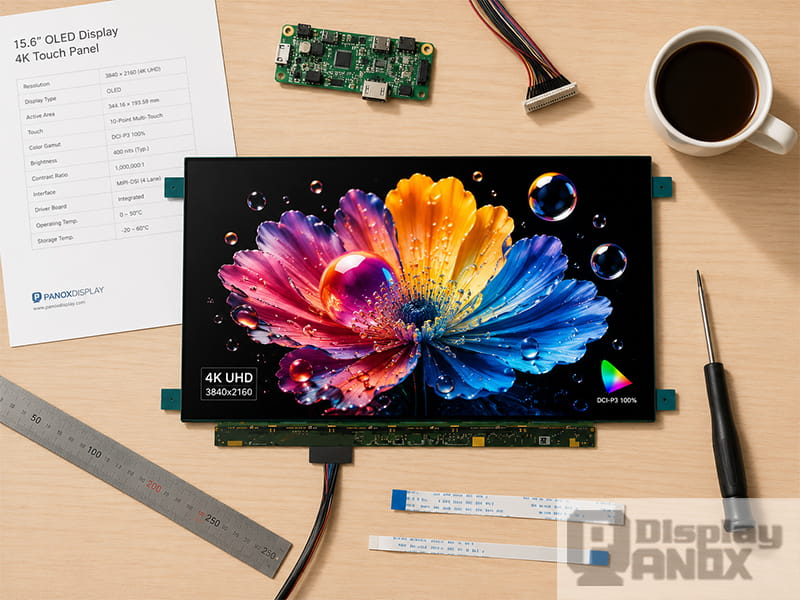
15.6 inch Full Color OLED Display 4K Touch Panel
A monitor display is often judged by the finished image: sharp text, smooth motion, deep blacks, clean color and comfortable brightness. For engineers, product designers and sourcing teams, however, the real decision starts one layer deeper — with the display panel itself.
The monitor display panel determines the resolution, pixel density, color performance, power behavior, interface, mechanical thickness and long-term reliability of the final product. A 4K display monitor, a portable OLED monitor, an industrial inspection screen and a compact embedded display may look similar from the outside, yet their panel requirements can be very different.
This guide explains what a monitor display panel is, why 4K and OLED matter, when LCD is still the better choice, and how to select a display panel for real product development. It also introduces Panox Display’s monitor display panel options, including 15.6-inch 4K OLED panels and supporting solutions such as touch panels, connectors and HDMI controller boards.
What Is a Monitor Display Panel?
A monitor display panel is the core visual component inside a monitor or display-based device. In a finished consumer monitor, users normally see the housing, stand, ports and menu system. In product development, the more important part is the panel module: the active display cell, driver electronics, FPC, interface, cover structure and sometimes an integrated or external touch panel.
Depending on the technology, a monitor display panel may be based on TFT-LCD, IPS-LCD, AMOLED or other flat-panel display structures. LCD panels use a backlight and liquid crystal layer to control light transmission. OLED panels use self-emissive organic pixels, allowing each pixel to produce light independently. This basic difference affects contrast, thickness, response time, power behavior and lifetime planning.
For B2B projects, “monitor display” usually refers to a panel or display module that can be integrated into a custom device, rather than a finished desktop monitor. This is why the selection process needs to cover more than screen size and resolution. Interface type, driving method, mechanical outline, brightness, touch integration and supply stability all matter.
The Society for Information Display’s ICDM describes display evaluation as a measurement-based field covering many display characteristics and technologies, with the Information Display Measurements Standard offering standardized methods for quantifying electronic display performance. That is a useful reminder: a reliable monitor display panel should be selected through measurable parameters, not only through marketing terms.
Why 4K Resolution Matters in Monitor Display Design
A 4K display monitor usually refers to UHD 4K resolution, or 3840 × 2160 pixels. This is twice the horizontal and twice the vertical resolution of Full HD, resulting in four times the pixel count of 1920 × 1080. In some cinema-oriented contexts, 4K may also refer to DCI 4K at 4096 × 2160, but UHD 4K is the common format for PC monitors and embedded monitor-style displays.
The value of 4K is not only “more pixels.” It depends on screen size, viewing distance and software scaling. On a large 32-inch monitor, 4K gives more workspace and finer detail. On a 15.6-inch portable monitor display, 4K produces very high pixel density, making text, UI edges, product images, medical images and camera feeds look cleaner at close viewing distances.
For example, EIZO’s pixel density reference lists a 15.6-inch UHD 4K display at about 282 PPI, much higher than a typical 23-inch Full HD desktop display at about 96 PPI. That difference is easy to see in fine typography, icon edges and image detail.
In practical product design, 4K is especially useful when the monitor display is used for:
| Application | Why 4K Helps |
|---|---|
| Portable productivity monitors | Sharper text and more flexible scaling |
| Camera field monitors | Better focus checking and image review |
| Medical or inspection displays | Finer visual detail for image-heavy workflows |
| Industrial vision systems | Clearer status, image and data display in one screen |
| Creative preview devices | Better rendering of high-resolution video or design content |
| Premium embedded systems | Higher perceived quality in a compact product |
The trade-off is also clear. A 4K display monitor panel requires higher signal bandwidth, more careful interface selection and stronger system-side processing. If the device only shows simple UI elements, 4K may add cost and integration complexity without much visual benefit. If the device handles images, video, dense UI or precision work, 4K becomes much easier to justify.
OLED Panel for Monitor: Why It Is Different from LCD
An OLED panel for monitor applications uses self-emissive pixels. When a pixel needs to show black, it can be turned off at the pixel level. This gives OLED its well-known advantages: deep black, very high contrast, fast response time, wide viewing angle and thin mechanical structure.
Recent research on consumer OLED monitor systems found that current OLED displays can be promising even for some vision-science experiments, where luminance behavior, uniformity, gamma, color gamut, response time and waveform behavior are measured carefully. In the tested system, one OLED gaming monitor showed excellent response time, a sharp waveform at 240 Hz, 94% DCI-P3 coverage and strong luminance uniformity among the compared display systems.
For monitor display panel selection, OLED is attractive when image quality is a major selling point. Deep black is valuable for video, gaming, camera preview, medical imaging review, control rooms with dark UI, premium portable monitors and high-end industrial interfaces. Thin panel structure also helps when the final product needs to be light, slim or visually refined.
OLED still needs careful usage planning. Static UI elements, high brightness operation and long unattended display time can increase the risk of uneven pixel aging. Modern OLED monitors use protection methods such as pixel shifting, static element dimming and refresh cycles, but panel selection should still match the real use case. ViewSonic’s OLED burn-in guidance explains that permanent image retention is linked to static content shown over very long periods, while varied content and built-in care features reduce the risk significantly.
This is why OLED monitor display panels are a strong choice for premium visual performance, while long-term static dashboards, harsh public signage or always-on industrial screens may still favor LCD or carefully specified industrial OLED solutions.
LCD and IPS-LCD Still Have an Important Place
OLED often gets attention because of its contrast and thinness, but LCD remains a practical and widely used monitor display technology. IPS-LCD panels are especially common where wide viewing angle, stable production, predictable cost and long display time are important.
LCD monitor panels can be a better fit for bright environments, continuous static UI, cost-sensitive projects and systems that need high brightness for readability. Since LCD panels use a backlight, the backlight design can be adjusted for brightness, power and thermal requirements. For industrial or outdoor-adjacent display products, this flexibility is useful.
Research on ambient contrast ratio also shows why the viewing environment matters. In low ambient light, high static contrast plays a major role. As ambient light increases, higher display brightness becomes more important, and surface reflection also affects perceived contrast.
In simple terms: OLED may look excellent in controlled or dim environments because of pixel-level black control. In a bright workspace, factory floor or outdoor device, brightness, surface treatment and reflection control can matter as much as native contrast. A good monitor display selection should start from the environment, not from the panel technology name alone.
Key Specifications to Check Before Choosing a Monitor Display Panel
Resolution and Pixel Density
Resolution tells you how many pixels the panel has. Pixel density tells you how tightly those pixels are packed into the physical screen size. A 15.6-inch 4K monitor display feels very different from a 32-inch 4K monitor because the smaller panel has much higher PPI.
For embedded products, portable monitors and close-viewing devices, high PPI can make the interface feel more premium. For large screens viewed from farther away, screen size and brightness may be more important than extreme pixel density.
Brightness, Contrast and Ambient Readability
Brightness is usually measured in cd/m² or nits. Contrast ratio describes the difference between bright white and dark black. For OLED, the ability to turn off pixels gives very strong black performance. For LCD, contrast depends on the liquid crystal mode, backlight structure and optical design.
However, real viewing quality also depends on ambient light. A panel with excellent dark-room contrast may lose perceived depth under strong reflections. For monitor display products used in offices, vehicles, workshops or outdoor-adjacent environments, brightness and surface treatment should be checked together.
Color Gamut and Color Depth
For creative, medical imaging review, camera preview and premium entertainment applications, color performance is more than a nice extra. DCI-P3 coverage, sRGB accuracy, bit depth, gamma behavior and factory calibration can all affect the final viewing experience.
VESA’s DisplayHDR 1.2 update also shows how modern monitor evaluation has moved toward stricter testing for luminance, color gamut, bit depth, color accuracy, contrast, black level and subtitle flicker. These criteria are designed for HDR certification, but the same thinking is useful for panel selection: color and brightness should be measured as a system, not treated as isolated numbers.
Refresh Rate and Response Time
Refresh rate describes how many times the screen updates per second. Response time describes how quickly pixels transition. A standard 60 Hz panel is enough for many productivity, industrial and embedded display applications. Higher refresh rates such as 90 Hz, 120 Hz or above become more important for gaming, motion-heavy interfaces, camera monitoring and interactive systems.
OLED panels usually have very fast pixel response, which can reduce motion blur. LCD panels can also perform well when they use optimized liquid crystal modes, overdrive and suitable timing control. For the final product, the panel is only one part of the motion experience. Signal source, controller board, firmware, frame buffering and touch latency also need attention.
Interface and Driving Method
A monitor display panel cannot work by resolution alone. The interface decides how video data reaches the panel. Common interfaces include eDP, LVDS, MIPI, RGB, HDMI through a controller board, and sometimes DisplayPort or Type-C video through a custom driving solution.
For thin 4K monitor display panels, eDP is common because it supports high-resolution panel driving in compact systems. LVDS still appears in many industrial and legacy display designs. MIPI is common in mobile and compact embedded devices. HDMI is convenient for developers, Raspberry Pi, PC-based systems and test setups, but bare panels usually need a controller board to accept HDMI input.
Panox Display’s monitor display tag lists interface filters including MIPI, LVDS, eDP and HDMI, and the company also provides customized controller or driver boards with VGA, HDMI, DVI, DP, Type-C video input and panel-side outputs such as MIPI, RGB, LVDS and eDP.
Panox Display Monitor Display Panel Options
Panox Display focuses on small and medium-size OLED and LCD panels, with product categories including AMOLED, PMOLED, TFT-LCD, Memory LCD, flexible OLED, Micro OLED, Raspberry Pi display panels and industrial LCD panels. Its product range covers display sizes from 0.39 inch to 15.6 inch.
For monitor display panel projects, the current tag page highlights two 15.6-inch 4K AMOLED panels. These are especially relevant for portable monitor, laptop-style monitor, high-resolution embedded display and premium visual system development.
| Product Direction | Key Value for Monitor Display Projects |
|---|---|
| 15.6-inch 4K OLED panel | High resolution, high contrast, thin structure and vivid image quality |
| 15.6-inch 4K OLED touch panel | Suitable for interactive portable monitor or embedded monitor products |
| Custom touch panel service | Helps match the panel to product ID, cover glass and touch requirements |
| HDMI / Type-C controller board support | Makes panel testing and PC/Raspberry Pi connection easier |
| Connectors and FPC support | Reduces early-stage integration friction |
One listed 15.6-inch 4K AMOLED model uses 3840 × 2160 resolution, 60 Hz refresh rate, 440 cd/m² typical luminance, 100% DCI-P3 color, 100,000:1 minimum contrast ratio and an eDP 4-lane signal type. The same product page lists a wide operating temperature range of -40 to 70 °C and a typical mass of 200 g, which makes it relevant for slim high-resolution display systems.
Another 15.6-inch Samsung AMOLED touch display listed by Panox Display uses 3840 × 2160 resolution, eDP 4-lane interface, 60 Hz frequency, 400 cd/m² brightness, about 282 PPI, 2.2 mm thickness and 100,000:1 contrast ratio. Panox Display also notes support for full lamination capacitive touch panel service and eDP-to-HDMI controller board options for this type of panel.
For developers, this matters because a high-quality panel is only the beginning. A monitor display project often needs cover glass, touch structure, controller board, connector selection, FPC adaptation, firmware settings and optical bonding decisions. Panox Display positions these as part of its complete display solution, including customized cover glass/touch panel service and controller/driver boards.
Where 4K OLED Monitor Display Panels Are Used
A 4K OLED monitor display panel is best suited to applications where image quality is part of the product value. The following use cases are especially suitable.
Portable 4K monitors benefit from OLED because the panel can be thin, light and visually impressive. A 15.6-inch 4K OLED panel gives high pixel density in a travel-friendly size, making it suitable for secondary screens, presentation monitors and premium mobile workstations.
Camera and video monitoring devices can use 4K OLED panels for focus checking, color-rich preview and high-contrast image review. The deep black level of OLED is useful when reviewing dark scenes, while high pixel density helps with fine details.
Medical and laboratory display systems may use high-resolution OLED or LCD monitor panels for image review, instrument UI and data visualization. For any regulated medical device, the display selection should be matched with the required certification, calibration and reliability process.
Industrial inspection and machine vision systems often need sharp image display, reliable interface support and stable supply. In these applications, 4K can improve image review, while the choice between OLED and LCD depends on brightness, static UI time, operating temperature and expected lifetime.
Gaming, simulator and entertainment systems benefit from fast response, strong contrast and high color saturation. OLED can be a strong choice here, especially when the content changes frequently and the product can include screen protection behavior in the system design.
How to Choose the Right Monitor Display Panel
Start with the product scenario. A panel that looks excellent in a dark demo room may need higher brightness or different surface treatment in a bright industrial space. A panel that is perfect for video may need extra protection if the final product shows static UI for many hours each day.
A practical selection process should answer these questions early:
| Design Question | What to Check |
|---|---|
| How close will the user view the screen? | Screen size, resolution and PPI |
| Will the content be static or dynamic? | OLED aging risk, LCD suitability and UI protection |
| Is the product used in bright light? | Luminance, surface reflection and cover glass |
| Does the system need touch? | On-cell, in-cell or external CTP structure |
| What is the video source? | eDP, LVDS, MIPI, HDMI, Type-C or controller board |
| Is the enclosure thin or weight-sensitive? | Panel thickness, FPC position and mechanical outline |
| Will it run continuously? | Lifetime, thermal design and power behavior |
| Is the display color-critical? | DCI-P3 / sRGB coverage, color depth and calibration plan |
For many projects, the best workflow is to test the panel with a controller board first, verify brightness and image behavior with real content, then move into mechanical design, touch integration and customized driving. This avoids the classic display-project headache: the panel looks perfect on paper, then the interface, FPC direction or cover glass structure makes integration awkward.
Conclusion
A monitor display panel should be selected as a complete visual component, not only as a resolution number. 4K improves detail and pixel density. OLED improves contrast, black level, response and thinness. LCD remains valuable for brightness, long static operation, cost control and industrial reliability. Interface, touch structure, controller board support and mechanical integration decide whether the panel can actually become a stable product.
For high-resolution portable monitors, embedded visual systems, camera monitors, industrial inspection devices and premium display products, Panox Display’s 15.6-inch 4K OLED monitor display panels provide a strong starting point. Combined with customized touch panels, connectors and controller board support, they can help development teams move from panel evaluation to real product integration with fewer obstacles.
Learn more: Monitor Display Panel Applications: Where 4K OLED and LCD Panels Are Used
FAQ: Monitor Display Panels
What is a monitor display?
A monitor display is the screen system used to show visual output from a computer, embedded board, camera system, instrument or other device. In component sourcing, it usually refers to the display panel or module inside the final monitor product.
Is a 4K display monitor always better than Full HD?
A 4K display monitor gives higher pixel count and sharper detail, but it also requires more bandwidth and system processing. It is most useful for image-rich content, fine text, video preview, design work, medical or inspection display and premium portable monitors.
Is OLED good for monitor display applications?
OLED is excellent for monitor display applications that need deep black, high contrast, fast response, wide viewing angle and thin mechanical design. It should be used carefully for long-term static UI or very high brightness continuous operation, where pixel aging needs to be considered.
When should I choose LCD instead of OLED?
LCD is often better for cost-sensitive products, long static display time, high brightness requirements, industrial environments and applications where burn-in risk must be minimized. IPS-LCD is a practical choice when viewing angle and stable all-day operation matter.
Can a bare monitor display panel connect directly to HDMI?
Usually no. Many bare panels use eDP, LVDS, MIPI or RGB interfaces. To connect them to HDMI, Type-C, DisplayPort or a PC/Raspberry Pi source, a suitable controller board is normally required.
Does Panox Display provide controller boards for monitor display panels?
Yes. Panox Display provides customized controller/driver board support for video inputs such as HDMI, VGA, DVI, DP and Type-C, with output support for panel interfaces including MIPI, RGB, LVDS and eDP. This helps developers test and integrate bare display panels more easily.