







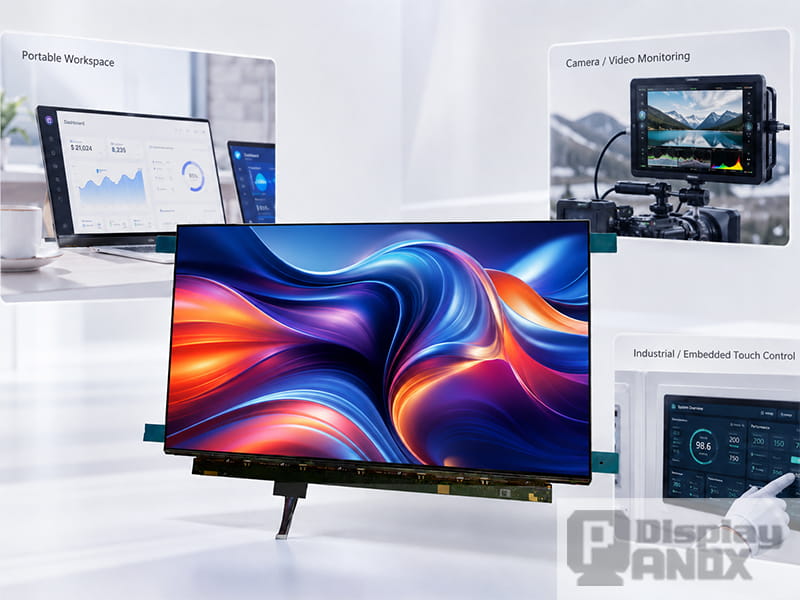
15.6 inch Full Color OLED Display 4K Touch Panel
Monitor display panels are no longer limited to desktop monitors. As devices become thinner, more visual and more interactive, monitor-style panels now appear in portable screens, embedded terminals, inspection systems, medical review devices, gaming setups, test equipment and high-end product interfaces.
For product developers, the key question is not whether a panel can show an image — almost any can. The real question is whether a specific monitor display panel fits the application: screen size, resolution, contrast, brightness, interface, touch structure, mechanical thickness and controller board all have to work together.
A 4K monitor panel brings sharp text and fine image detail. An OLED panel for monitor applications adds deep black, high contrast, fast response and a thinner module. LCD panels stay useful where stable brightness, long static display time and predictable cost matter more. The best choice always depends on the product scenario — so this article walks through the real applications where these panels are used, and what each one actually demands.
Panox Display's Monitor Display tag currently centers on 15.6-inch AMOLED 4K panels, including EDO and Samsung options at 3840 × 2160 resolution. These are especially relevant for compact high-resolution products: portable monitors, embedded visual systems, evaluation equipment and premium monitor-style devices.
1. Portable 4K Monitor Displays
Portable monitors are the most direct application for monitor display panels. A 15.6-inch panel is large enough for productivity, media preview and content work, yet still compact enough for mobile setups — which is why 15.6-inch and 16-inch panels dominate portable monitor products.
Here, a 4K OLED panel creates a strong premium impression. UHD 3840 × 2160 gives about 8.3 million pixels — four times Full HD in the same aspect ratio — for sharper text, finer detail and more usable workspace at the same size. Because the user usually sits close to a portable screen, pixel density becomes very visible: fine typography, UI icons, spreadsheets, product photos and video previews all benefit. OLED's deep black and high contrast then make the whole product feel more advanced, especially with dark UI, media playback and creative preview.
Panox Display's 15.6-inch full-color OLED 4K touch panel (Samsung ATN56WR01) is specified at 3840 × 2160, 282 PPI, 400 cd/m² typical luminance, 60 Hz, 1.06B colors with 100% DCI-P3, 100,000:1 contrast, 1 ms response, an eDP 4-lane interface and a 2.2 mm outline at roughly 200 g — a combination suited to slim portable designs where weight and structure matter.
| Suitable product | Why this application fits |
|---|---|
| Portable second monitor | High-resolution workspace in a thin format |
| Laptop companion display | 15.6-inch size matches notebook-style use |
| USB-C / HDMI portable monitor | Buildable with a suitable controller board |
| Travel display for designers/engineers | Better text sharpness and visual detail |
| Premium mobile workstation accessory | OLED contrast and color raise perceived quality |
For this type of product, evaluate the panel together with controller board support, cover glass, enclosure thickness and power design. A bare 4K OLED panel is only the starting point; the final monitor experience depends on the whole display system.
2. Creative Review and Visual Production Displays
Creative professionals care about color, contrast and detail because the screen directly shapes how images and video get judged. A monitor display panel for creative review needs more than resolution — it needs stable color behavior, a suitable gamut, predictable brightness and good uniformity.
OLED is attractive here: deep black and high contrast without a backlight help with video preview, dark scenes, UI contrast and image depth. For compact review devices, a 15.6-inch 4K OLED panel fits portable editing monitors, color preview tools, media review stations and product demo displays. Modern evaluation standards show why these factors matter — VESA's DisplayHDR criteria measure luminance, black level, color gamut, bit depth, contrast behavior, luminance accuracy and color error. Even when a product will never seek certification, those categories are a useful checklist for what makes a professional monitor feel visually reliable.
The Panox Display 15.6-inch OLED panel lists 1.06B colors, 100% DCI-P3, 100,000:1 typical contrast and 1 ms typical response — all relevant to visual-rich monitor work.
| Suitable product | Display requirement |
|---|---|
| Video preview monitor | High contrast, rich color, sharp detail |
| Design review display | 4K resolution and wide color presentation |
| Photography review device | Fine detail and clean tonal separation |
| Product demo display | Strong visual impact and slim appearance |
| Color-rich control interface | High perceived quality, smooth UI rendering |
For color-critical work, teams should still plan calibration and validation. A wide-gamut panel is a strong foundation, but the final system needs proper driving, color settings and quality control.
3. Camera Monitors and Field Video Displays
Camera monitors and field displays need a screen that helps users judge framing, focus, exposure and color fast. A 4K panel matters because operators often check small details while shooting or reviewing footage.
OLED is valuable here because dark scenes, high-contrast lighting and cinematic content are easier to judge with strong black levels, and fast response helps when monitoring motion. Research on OLED monitor systems supports this: one tested consumer OLED monitor showed excellent response time, clean waveform behavior at 240 Hz, 94% DCI-P3 coverage and strong luminance uniformity among the systems compared. A 15.6-inch 4K OLED panel suits larger field monitors, director monitors, video-village displays, portable review screens and camera-control terminals, and touch integration supports on-screen menus, waveform tools, focus assist and parameter control.
| Suitable product | Why panel quality matters |
|---|---|
| Field production monitor | Fine detail aids focus and framing |
| Director monitor | 15.6-inch screen supports group review |
| Camera control display | Touch enables direct UI operation |
| Video playback monitor | OLED contrast improves dark-scene review |
| Mobile editing preview | 4K supports high-resolution footage |
Brightness and outdoor visibility need careful checking in this category. A panel that looks excellent indoors may need extra optical design, cover-glass treatment or shading for outdoor shooting.
4. Industrial Inspection and Machine Vision Displays
Industrial products use monitor display panels for image inspection, equipment control, process monitoring and machine-vision output — screens that show camera feeds, measurement overlays, charts, warnings and dense status data.
4K helps when one screen must display both images and data, letting operators inspect more detail without switching views. For machine vision, the display may show captured images, defect areas, measurement lines and live diagnostics; higher resolution gives the interface more room and makes small information easier to read. OLED suits systems that benefit from high contrast, fast response and premium quality; LCD is often better where the display holds static UI for very long periods, runs in bright environments or needs a cost-optimized structure. Operating hours, content type, ambient light and lifetime expectations decide the call.
| Suitable product | Recommended display focus |
|---|---|
| Visual inspection equipment | High resolution and image sharpness |
| Machine-vision review screen | 4K detail and stable rendering |
| Factory control terminal | Brightness, durability, touch reliability |
| Measurement instrument display | Fine line clarity and readable UI |
| Equipment diagnostic monitor | Interface compatibility and long-term stability |
For industrial use, evaluate the panel with real UI content. A display that impresses with a demo image can behave differently with static dashboards, small text, gray backgrounds or high-contrast warning colors.
5. Medical and Laboratory Review Displays
Monitor display panels appear in medical and laboratory equipment for image review, instrument control, sample observation, patient-side interfaces and data visualization. These applications need careful planning, because display performance affects how visual information is interpreted.
For medical imaging, grayscale behavior and calibration are critical. DICOM Part 14 defines the Grayscale Standard Display Function, which maps presentation values to luminance based on human contrast sensitivity and just-noticeable luminance differences. This does not mean any monitor panel can serve as a diagnostic display — diagnostic use may require specific certification, calibration, quality assurance and regulatory validation. But high-resolution OLED or LCD panels are still useful for non-diagnostic review, lab instruments, training devices, control interfaces and image-rich equipment screens when the system is designed and validated correctly.
| Suitable product | Display requirement |
|---|---|
| Laboratory instrument interface | Sharp UI, stable color, readable charts |
| Medical training display | High-resolution image and video |
| Non-diagnostic image review | Good contrast and fine detail |
| Patient-side interactive monitor | Touch integration and clean design |
| Research equipment display | Accurate rendering, predictable settings |
Define early whether the screen is for general display, review, training or diagnostic interpretation. The stricter the use case, the more calibration, quality assurance and compliance matter.
6. Gaming, Simulation and Interactive Entertainment
Gaming and simulation systems value strong contrast, vivid color, fast pixel response and immersive image quality — areas where OLED's self-emissive pixels help with dark scenes, high contrast and quick transitions. Panox Display's 15.6-inch OLED panel is rated at 1 ms response with 100,000:1 contrast and a 2.2 mm profile, which supports thin, visually rich entertainment displays.
One honest caveat belongs here: this particular panel runs at 60 Hz, so it is a strong fit for contrast- and color-driven experiences and media-heavy interactive displays, rather than high-refresh competitive gaming, which typically targets 120 Hz and above. Used within that scope, a 4K OLED panel works well in premium portable entertainment monitors, media-focused simulator and cockpit displays, arcade-style upgrade screens, console companion monitors and immersive visual control panels.
| Suitable product | Why OLED helps |
|---|---|
| Portable entertainment monitor | High contrast and rich color improve immersion |
| Media/simulator display | Fast response and vivid image aid motion scenes |
| Entertainment terminal | OLED black level improves media playback |
| Visual QA / test screen | 4K detail helps spot fine issues |
| Premium interactive display | Thin module supports modern design |
For any gaming-adjacent product, refresh rate, input latency and controller-board performance must be evaluated together. Strong panel response alone is not enough — the full signal chain has to process and transmit smoothly.
7. Embedded Touch Monitor Displays
Many embedded products now use monitor-style displays as the main interface: smart equipment, retail terminals, control panels, kiosks, medical carts, industrial dashboards and high-end consumer devices. A 15.6-inch panel gives enough space for visual information while still fitting compact enclosures.
Touch integration is central here. Panox Display supplies its 15.6-inch OLED panel with full-lamination capacitive touch service and an eDP-to-HDMI controller board, plus customized cover glass, touch support and technical materials for development and batch orders. A full-lamination structure reduces the visible gap between layers, improving perceived contrast and cutting internal reflection — and for embedded products it also makes the front surface cleaner and more integrated. Cover-glass shape, thickness, surface treatment, touch IC, FPC routing and bonding method should all be planned early.
| Embedded application | Display design priority |
|---|---|
| Retail touch terminal | Touch response, durability, visual appeal |
| Smart equipment control panel | UI clarity and mechanical integration |
| Industrial HMI | Brightness, touch reliability, interface support |
| Medical cart display | Clean design and readable information |
| Premium appliance interface | Thin structure and high perceived quality |
For embedded displays, design the enclosure and panel together. Select the display too late and the cover glass, FPC exit direction, driver-board position and mounting method may all need rework.
8. Engineering Test Benches and Development Kits
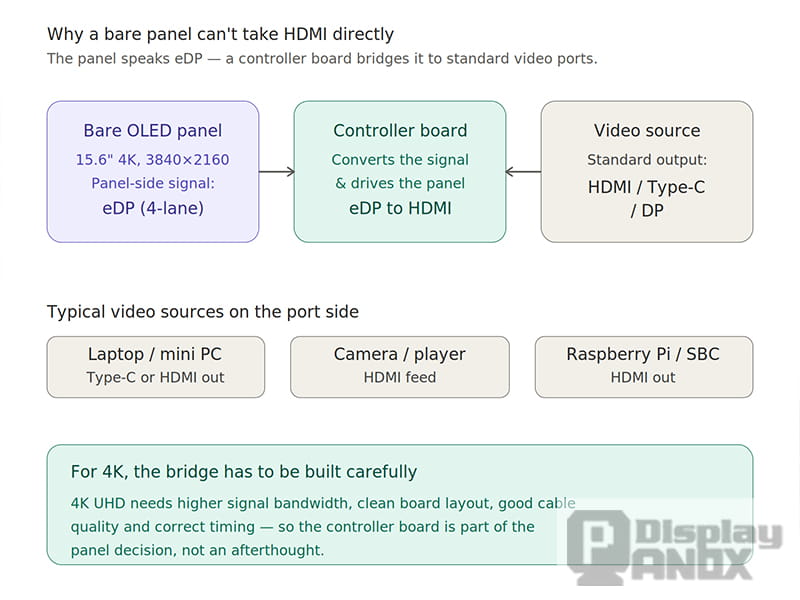
Monitor display panels are also everyday tools in engineering labs. Before a panel becomes part of a finished device, engineers test resolution, signal timing, color, brightness, touch, power behavior and mechanical fit.
This is where controller-board support becomes practical. A bare panel uses eDP, LVDS, MIPI or another panel-side interface, while the bench often needs HDMI or Type-C input. Panox Display provides free connectors and an adapter board so developers can fly-wire the display to a main board, and can support customized HDMI/Type-C input boards when needed. For a 4K OLED panel, early testing matters because signal bandwidth, board layout, cable quality and timing all affect stability — so engineers should verify real content, not just color bars: text rendering, UI scaling, video playback, touch response and thermal behavior, all before mechanical design is frozen.
| Development use | Why it matters |
|---|---|
| Panel evaluation kit | Confirms image quality before enclosure design |
| Controller board testing | Verifies interface and signal stability |
| Touch panel prototype | Tests input response and cover-glass structure |
| UI development screen | Checks scaling, typography and layout |
| Customer demo module | Shows real product performance early |
A strong application starts with a controlled test process. The earlier the team validates panel and driving solution, the fewer surprises appear during enclosure design and batch production.
Choosing the Right Monitor Display Panel for Each Application
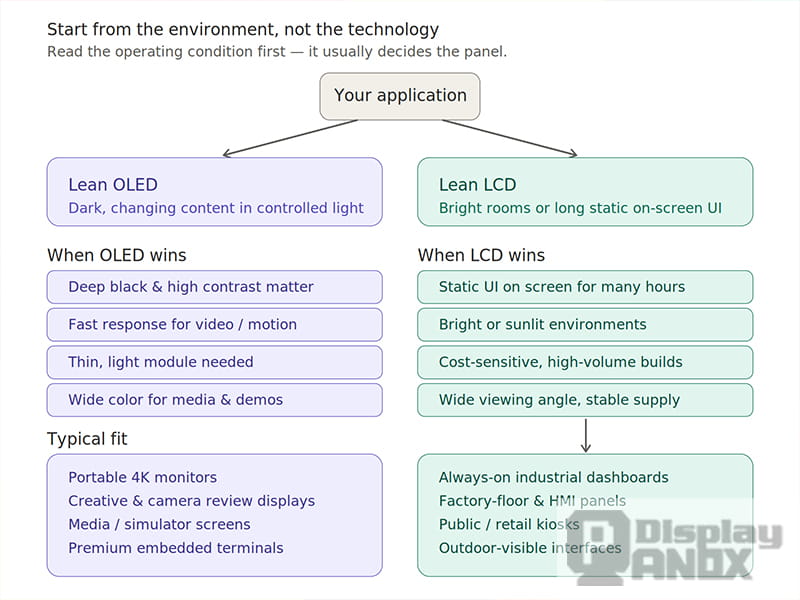
A monitor display panel should be chosen for the final product environment. The same 15.6-inch 4K OLED that is ideal for a portable monitor may need different lifetime planning — or an LCD alternative — in an always-on industrial dashboard.
| Application | Important features | OLED or LCD consideration |
|---|---|---|
| Portable 4K monitor | Thin design, high PPI, low weight, controller board | OLED strong for premium image quality |
| Creative review display | Gamut, contrast, calibration potential | OLED attractive; calibration still needed |
| Camera monitor | Detail, contrast, motion response, brightness | OLED good for dark scenes; check brightness |
| Industrial inspection | Resolution, reliability, UI readability | OLED or LCD by static UI and environment |
| Medical/lab equipment | Grayscale, calibration, detail, compliance path | Use case decides panel and validation level |
| Media/simulation | Response, contrast, color, latency | OLED strong when system latency is controlled |
| Embedded touch terminal | Touch stack, cover glass, FPC routing | OLED for premium look; LCD for long static use |
| Development kit | Interface, connectors, controller board | Panel-side interface and adapter board critical |
How Panox Display Supports Monitor Display Applications
Panox Display focuses on small and medium-size OLED and LCD panels — AMOLED, TFT-LCD, Memory LCD, Micro OLED and more — across many sizes and shapes, with the Monitor Display tag centered on 15.6-inch AMOLED 4K panels for monitor-style applications.
For these projects, support goes beyond the panel. The 15.6-inch OLED offering includes full-lamination capacitive touch service, eDP-to-HDMI controller board support, connectors, adapter boards and customized HDMI/Type-C input board options.
| Project need | Panox Display support direction |
|---|---|
| 4K OLED panel sourcing | 15.6-inch AMOLED monitor display panels |
| Touch interaction | Customized CTP and full-lamination service |
| PC or dev-board input | HDMI / Type-C controller board support |
| Panel connection | Connectors and adapter board support |
| Custom product structure | Cover glass, touch and display integration |
| Early evaluation | Sample testing and specification support |
For teams developing portable monitors, embedded visual systems, control terminals, inspection equipment or high-end display devices, this shortens the path from panel selection to working prototype.
Conclusion
Monitor display panels are used wherever a product needs a clear, high-quality visual interface. A 4K panel is valuable for fine text, detailed images, camera feeds and dense UI. An OLED panel for monitor applications adds deep black, high contrast, vivid color, fast response and a thin structure. LCD panels stay important where brightness, long static operation, cost and industrial stability lead.
The best application depends on how the product will be used. Portable monitors need thin structure and high pixel density. Creative review needs color and contrast. Camera monitors need detail and response. Industrial systems need readability and reliability. Medical and lab devices need careful calibration and validation. Embedded touch terminals need panel, cover glass, touch layer and controller board to fit together.
Panox Display's 15.6-inch 4K OLED monitor display panels give a strong starting point for premium visual products. With touch customization, connectors and controller-board support, they integrate into portable monitors, embedded systems, development kits and professional display applications more smoothly.
Learn more: Why Monitor Display Panel Quality Matters More Than the Spec Sheet
FAQ: Monitor Display Panel Applications
What are monitor display panels actually used for beyond desktop monitors?
Portable monitors, creative-review and camera monitors, industrial inspection and machine-vision screens, non-diagnostic medical and lab interfaces, media/simulation displays, embedded touch terminals and engineering test benches — anywhere a product needs a clear, high-quality visual interface.
Is a 15.6-inch 4K OLED panel good for every one of these?
No. It is excellent for portable monitors, creative review, camera monitors and premium embedded devices. For always-on industrial dashboards with static UI, plan for OLED lifetime carefully or consider an LCD alternative better suited to long static operation.
Can this panel be used for gaming?
For contrast- and color-driven, media-heavy interactive displays, yes — its 1 ms response and deep black help. But it runs at 60 Hz, so it is not aimed at high-refresh competitive gaming, which usually targets 120 Hz or more.
What interface do these monitor panels use?
The 15.6-inch Samsung OLED uses an eDP 4-lane interface. To drive it from HDMI or Type-C sources, a controller board is used — Panox Display offers an eDP-to-HDMI controller board and customized HDMI/Type-C input boards.
Can the panel be used in medical devices?
For non-diagnostic review, training, control interfaces and lab instruments, yes, when properly validated. Diagnostic interpretation is different and may require specific certification, calibration and regulatory compliance (DICOM Part 14 grayscale being one relevant reference).
Does Panox Display support touch and controller integration?
Yes — full-lamination capacitive touch service, eDP-to-HDMI controller board, connectors, adapter boards and customized input boards, so panel, touch layer and driving path can be planned as one system.