
Specialist LCD/OLED Supplier
|
|








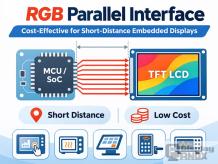
RGB Parallel LCD Interface: When Is It the Most Cost-Effective Choice?
When selecting a TFT LCD for an embedded device, the display interface can have a significant impact on the overall system cost. While MIPI DSI and LVDS are widely used in modern display applications, the traditional RGB parallel interface remains a practical option for
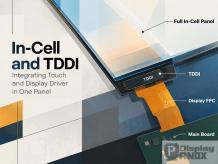
In-Cell vs On-Cell vs OGS Touch Screens: Differences in Structure, Cost, and Reliability
Capacitive touch screens have become standard in smartphones, tablets, and many other electronic devices. Yet two displays with similar specifications can behave quite differently depending on how their touch sensors are integrated. When selecting a touch display modu
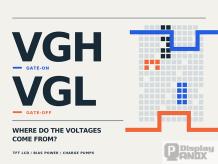
Where Do VGH and VGL Voltages Come From in TFT LCD Displays?
A TFT LCD module may operate from a 3.3V or 1.8V power supply, yet the thin-film transistors inside the panel often require much higher positive and negative voltages to switch correctly. The gate-on voltage (VGH) may reach +15V to +25V, while the gate-off voltage (VGL) can fall t

LCD Screen Brightness Explained: Nits vs cd/m², Lumens, Lux, and How to Measure It
A display specification may state that an LCD panel has a brightness of 350 nits. But what does that number actually mean? Is it the same as 350 cd/m², and how does it compare with lumens or lux? These questions frequently arise during LCD module selection, produ
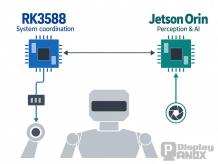
RK3588 vs Jetson Orin: Why Robots Separate Motion Control from AI
Motors, joints, cameras, and dexterous hands attract most of the attention in robot development. Inside the machine, however, the robot control board determines how those components work together—and whether the system can respond consistently while processing demanding AI w
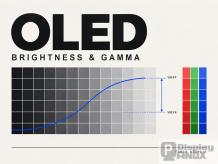
OLED Gamma Calibration: VREF, VREFP and VREFN Explained
Two OLED displays can have the same resolution and rated brightness yet produce noticeably different images. One may show smooth shadow transitions, while another loses dark detail or develops a color tint at low brightness. These differences can arise from the reference voltages,

Why RK3588 Is Becoming a Popular Robot Controller for Flexible OLED Displays and Edge AI
Robotics development is moving beyond motors, reducers, cameras, and lidar. These components may define what a robot can sense and how it can move, but they do not work independently. A robot also needs a central computing platform capable of coordinating motion, processing vis
MIPI DSI Display Bring-Up Guide: Lane Rate Calculation, Panel Initialization, Packet Format, and Troubleshooting
MIPI DSI display bring-up is often described as a register-configuration task. In practice, it is a chain of engineering decisions that begins with the panel specification and ends only when the display produces a stable image across temperature, voltage, startup, suspend, and res
Rockchip DRM/KMS Display Driver Guide: VOP2, Device Tree, Atomic Modesetting, and Black Screen Debugging
Rockchip display bring-up is not the work of a single “screen driver.” A working display depends on an end-to-end path that includes image generation, memory buffers, VOP or VOP2 scanout, a display interface controller, the PHY, power sequencing, and the panel or monitor it
Panox Display

Browse Articles by Category
OEM SERVICE
Customized Touch Panel

HDMI/Type-C Controller/Driver Board

Custmized LCD/OLED

Free Connectors

Find a Display to Fit Your Application

For More OLED/LCD Panels
If our display fit your application, subscrlbe for monthly Insights
Panox Display Professional OLED/LCD Supplier and Manufacturer
- 📍 Shenzhen
- 📞 Phone: 86 755 3396 6409
- 📠 Skype: panoxwesley

If it`s urgent, try to contact
Whatsapp: +86 18665870665
Skype: panoxwesley
QQ: 407417798